

 TERMINAL
 API
APIOrder history
Review completed trades and order execution history
Summary
This widget provides up-to-date information about the orders executed on a selected market partially or in full, as well as the orders that were canceled, rejected, and expired.
The entire order history of your account is available.
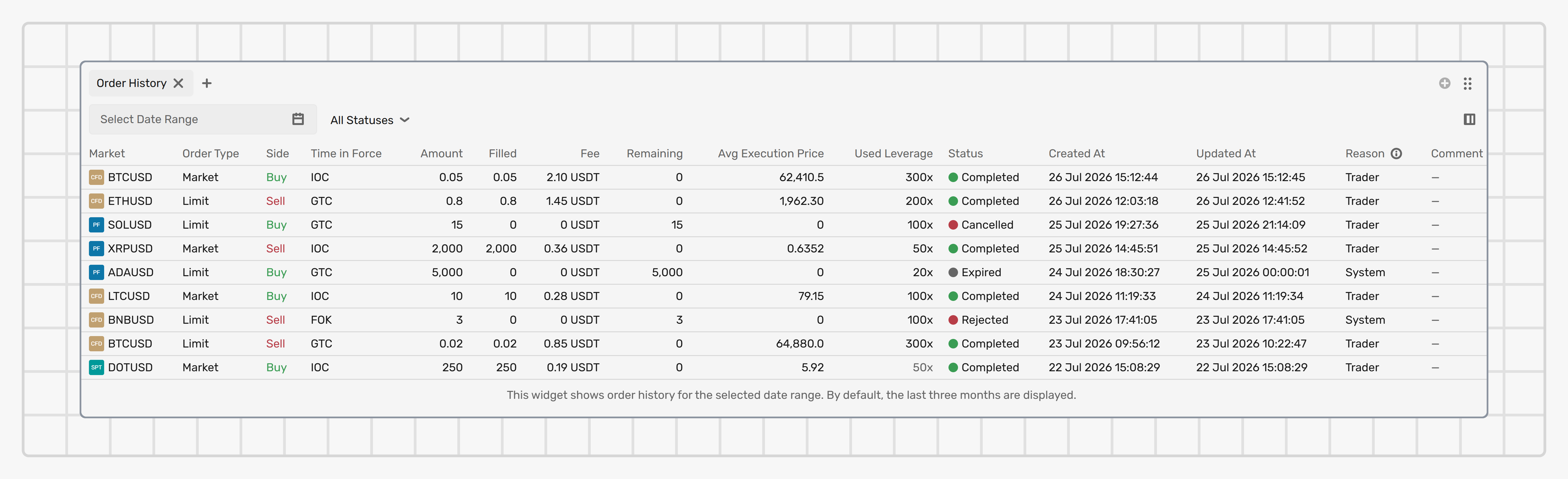
The widget lists only the orders to which final statuses are assigned. For a list of orders that are still being executed, use the Open orders widget.
Settings
Adjust the time period
By default, the widget lists the orders with the Completed status for the last three months. To display orders for a specific time period, use the Select date range field. To display orders with specific statuses, select one or more from the dropdown above the list. The most recent order appears at the top of the list.
Configure columns
Click the Configure columns button in the widget header to adjust the displayed information:
- Mark or unmark column checkboxes: To display or hide them; the column checkboxes highlighted in grey can’t be unmarked.
- Drag and drop the columns: To adjust their order in the table.
Fields
The following information is provided about each order:
Market
The market type (Spot, CFD, or Perpetual) and market ticker.
Full name
The market full name or description.
Side
The order side: Buy or Sell.
Order type
The order type.
Time in force
The Time in force.
Amount
The order amount, in the base currency.
Filled
The order amount that has been filled.
Fee
The total commissions paid for executing an order and the currency in which the commission was paid.
Remaining
The order amount that wasn't filled.
Avg execution price
The order execution price, as an average price of all trades executed while filling the order.
Used leverage
For CFD trading, the leverage ratio used when placing an order.
Status
The current order status: Completed, Cancelled, Rejected, or Expired.
Created at
The date and time when an order was placed.
Updated at
The date and time of the latest update to the order.
Order ID
The system identifier of an order.
Comment
The text note attached to the order when it was placed. Up to 100 characters. The comment can't be edited after the order is placed.
Reason
The reason for placing the order:
- Trader: The order was placed by you.
- Stop-out: The order was placed by the system, to close positions as a result of Stop out.
- Stop loss: The order was placed by the Stop loss trigger.
- Take profit: The order was placed by the Take profit trigger.
- Webhook alert: The order was placed via a TradingView webhook.
Zuletzt aktualisiert am